Hytale Server List 2026: How to Find and Join Public Servers
Learn how to use Hytale server lists, compare public communities and join through the current in-game flow without trusting invented IPs or downloads.
Short answer
A Hytale server list should help you discover and compare public communities; it should not be treated as a live promise of player counts, server IPs or official endorsement. Start with the current in-game discovery route, filter by mode and region, read the profile and rules, then use Join. Hosting files and private-server setup belong to a separate guide.

Is There an Official Hytale Server List?
The Hytale server list search usually mixes the official in-game discovery experience with community directories. Keep those routes separate: use the current client for the final Join action, and treat external names, IPs and download links as unverified until the game or an official source confirms them.
Hytale’s official Server Lists announcement describes server profiles, discovery and ways to join a server from the game. That makes server discovery a distinct search intent from Hytale server download or Hytale server hosting. This guide stays on the discovery side: how to compare communities, not how to run a dedicated machine.
The current context is Early Access. The official Update 5 hotfix record checked on August 2, 2026 lists stable client hotfix 0.5.7 dated July 22, 2026, but a future patch can change labels, filters or connection steps. Treat screenshots as orientation, not as a promise that every control will look identical in your installation.
Do not treat a search result, a server name or a copied IP address as an official recommendation. A useful Hytale server list gives you enough context to decide whether a community matches your play style, region, age group and tolerance for rules before you click Join.
How Hytale Server Discovery Works
The official discovery concept is closer to a catalog of community profiles than to a single ranking page. Start broad, then reduce the list using information that matters to your group.
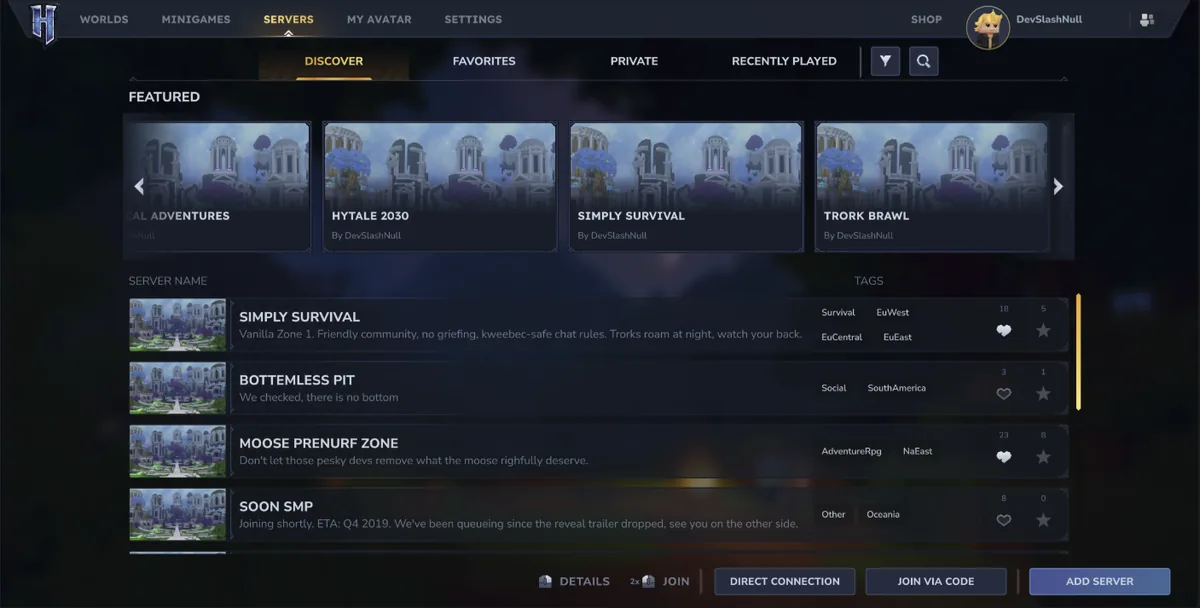
A public server list is useful because the name alone rarely tells you whether a server is suitable. The discovery screen shown in the official preview combines featured entries, server names, short descriptions, tags and actions such as opening details or joining. That structure lets you compare several communities without immediately downloading an unknown launcher or ZIP.
Featured placement should be treated as a starting point, not a quality guarantee. Read the description, check the region and server type, and look for rules that match the people you will play with. A server that looks popular can still be a poor fit if the time zone, chat policy or gameplay loop is wrong for your group.
- Begin with the official discovery screen in your current Hytale build whenever it is available.
- Use server type and region to remove obvious mismatches before reading every profile.
- Open details before joining so the description and community expectations are visible.
- Save a promising server only after you understand whether Favorites or Recently Played is available in your build.
- Use third-party lists as discovery hints only; verify the final route through the game or the current server owner.
How to Use Hytale Server List Filters
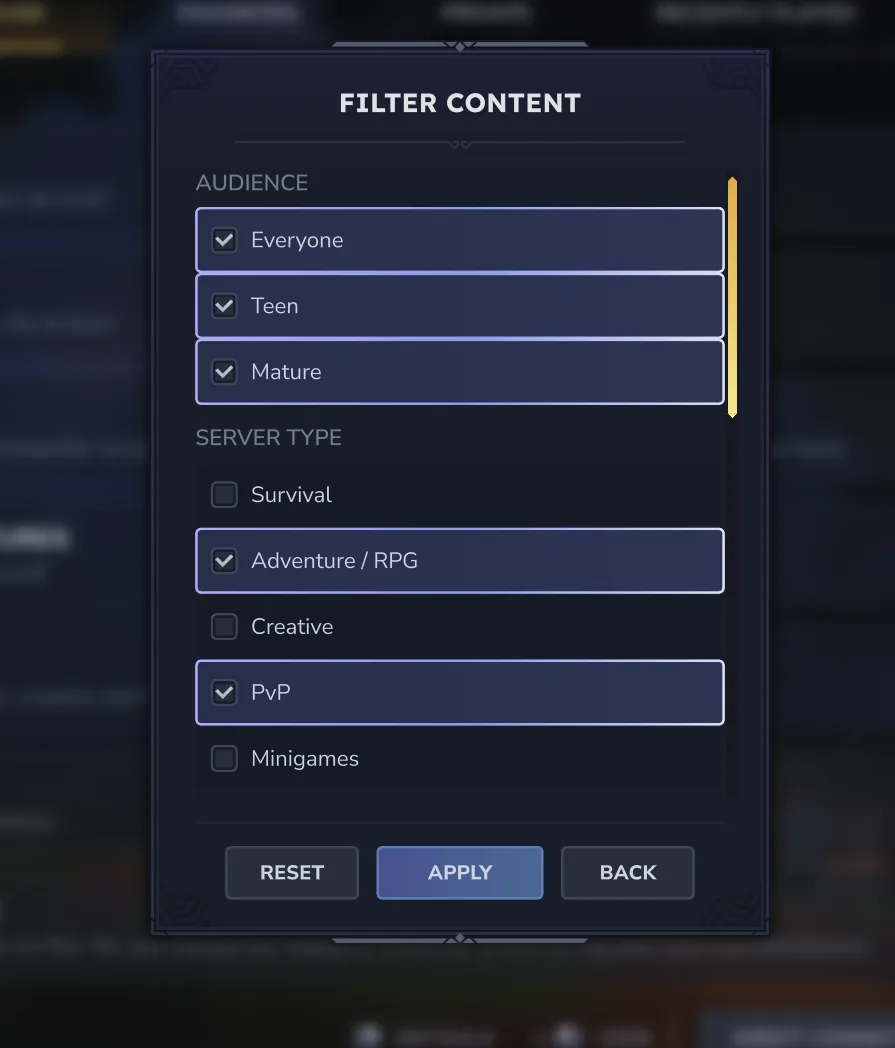
Filters are valuable when they reflect a real decision. Do not select every tag and assume the result is complete; start with the few constraints that matter most.
Audience and rules
Check whether the profile is marked for Everyone, Teen or Mature, then read the full server description. These labels help you narrow the list but do not replace the community’s written rules or your own judgment.
Server type
Survival, Adventure/RPG, Creative, PvP and minigame labels describe the expected loop. Choose the mode your group actually wants instead of chasing a broad best Hytale server claim.
Region and time zone
A region tag can hint at latency and active hours. It is not a guarantee of performance, so test the connection and consider when moderators or friends are normally online.
Tags and compatibility
Tags can reveal a roleplay, social, adventure or minigame focus. If a profile mentions a mod, custom pack or special client, verify the requirement through a trusted source before installing anything.
What to Check in a Hytale Server Profile
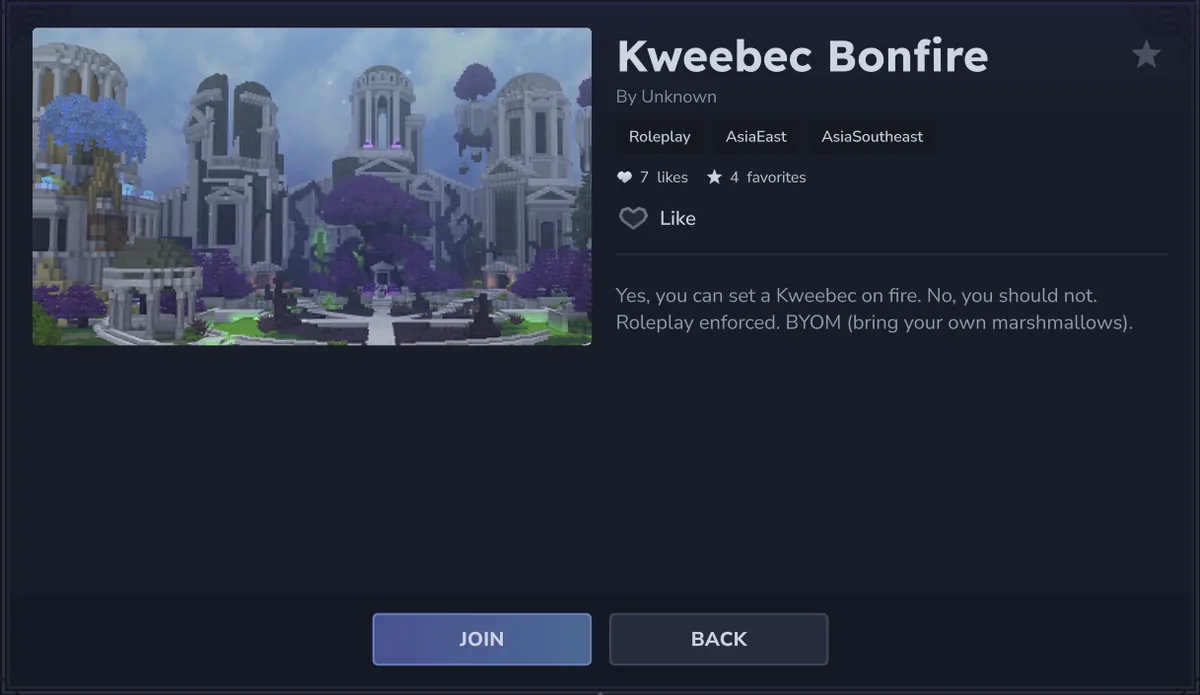
A profile should answer enough questions for you to make a low-risk first visit. Treat missing information as a reason to pause, not as proof that the server is bad.
The description
Look for a clear explanation of the game loop, rules and what a first session feels like. Vague promises such as unlimited rewards or secret access are less useful than specific expectations.
The owner or creator
A named owner or recognizable community identity makes it easier to find the correct support channel. It still is not a security guarantee, so never share account credentials or run unrelated installers.
Tags, region and audience
Use the combination rather than one tag. A roleplay server in the wrong region may be a worse fit than a smaller survival server near your friends.
Signals such as likes or favorites
Likes and favorites can show that other players interacted with a profile, but they are not reviews, moderation audits or proof of uptime. Read them as context only.
How to Join a Public Hytale Server
Use the shortest trustworthy path and keep the first session reversible. You should be able to leave without giving a server access to your account, files or system.
1. Update through the official launcher
Make sure your client comes from the official Hytale launcher and is on the release channel you intend to use. Do not install a second launcher because a server page says it is required.
2. Open the server discovery area
Use the current in-game Servers or discovery entry. The wording can change between builds, so follow the UI in your installed version rather than copying a video’s exact button labels.
3. Filter and open details
Choose a small set of filters, open the profile, read the description and note the region, server type and audience. If the details do not explain the community, choose another entry.
4. Join with the in-game action
Use Join, Direct Connection or the equivalent official action shown by your build. Never paste an unknown command into PowerShell or download an online-fix package to solve a normal connection prompt.
5. Test before committing
Spend a few minutes checking latency, rules, chat behavior and whether the world matches the description. Leave and remove the entry if the experience or requests do not feel right.
Hytale Server List Safety Checks
A server list should help you choose a community, not pressure you into an unrelated download. Be cautious when an entry sends you to a mirror, asks you to disable antivirus protection, requests an account password, or promises cracked multiplayer, no-premium access or a secret APK.
A server owner may publish a community page, a rules page or a support channel. That is different from giving a third-party installer permission to replace your launcher. Keep the official Hytale download and server manual as the baseline for client and server files.
Do not publish or trust a made-up Hytale server IP just to make an article look complete. Real addresses can change, can be private, and can belong to communities with their own rules. This page intentionally explains evaluation instead of pretending to be a live directory.
If your goal is to host a server for friends, use the separate server download guide. Hosting requires different checks for files, Java, ports, backups and permissions; mixing that intent into a server list page would make both pages less useful.
Practical rule
Use the game’s official discovery route for the final Join action. Treat external lists, IPs and download links as unverified until the current Hytale client or a clearly identified server owner confirms them.
Which Hytale Server Discovery Route Should You Use?
Different routes answer different parts of the search. Choose the route that matches the decision you need to make.
| Route | Best use | Main limitation |
|---|---|---|
| Official in-game discovery | Find profiles, filter communities and use the current Join flow | The UI and available entries can change with Early Access updates |
| Official Hytale documentation | Confirm release, server tools and supported connection concepts | It is not a live list of every community server |
| Trusted community list | Discover niche servers or communities not surfaced in your first search | Entries can be stale; verify the final route and rules |
| Random mirror or crack page | None for a safe Hytale server search | May be outdated, modified, unsafe or unrelated to the game |
Bottom Line
A good Hytale server list is a decision aid, not a pile of copied IP addresses. Start with official discovery, filter by audience, mode and region, read the profile, and test the community through the in-game route. That process answers the search intent while avoiding claims that cannot be verified.
If you need server files or a private host, continue to the separate Hytale server download guide. If your problem is whether your computer can run the game, use the system requirements guide instead. Keeping those boundaries clear helps each page answer one question well.
Treat a server profile as a snapshot, not a permanent guarantee. Revisit it after a client update or a major community change: the mode, region, age guidance, access requirements and moderation rules may have moved. A current server list helps you compare those details at the moment you plan to play.
Writing down a few facts for each candidate can make the choice clearer. Note the server type, region, audience, rule style, join route and the date you checked the profile. Popularity is only one signal: a busy server may have queues or strict rules, while a smaller community may fit your group better.
For a family or mixed-age group, check the audience label and moderation expectations before joining. If the current client cannot verify an entry, stop before installing anything, keep account credentials private, and use official Hytale downloads as the baseline. A community page is not a guarantee from Hytale.
Keep the page boundary clear when you share the result: this guide covers discovering and evaluating public communities, while the server download guide covers files and hosting. When a listing becomes stale, remove it from your shortlist instead of passing old details to someone else.
Before you click Join, compare the advertised play time and region with your group’s real schedule. A technically reachable server can still be a poor choice if moderation, language or peak-hour activity does not match what your players need.
If a listing claims to be official, look for a clear first-party reference instead of trusting a badge or a confident label. Use the official client and source pages for verification, and treat community links as community links. That distinction keeps a useful list honest.
Frequently Asked Questions
Official References
- Hytale official Server Lists article
- Hytale Update 5 hotfix 0.5.7
- Hytale Server Manual
- Hytale official download page
Checked: August 13, 2026
Related Hytale Guides
- Hytale Server Download Guide — For hosting files, Java, ports and backups.
- Hytale System Requirements — For checking whether your PC can run the client.
- Hytale Mods Guide — For separating server discovery from mod downloads.
- Hytale vs Minecraft — For broader sandbox and server comparisons.
- Hytale Multiplayer Guide — For playing with friends and choosing a connection path.