Hytale Release Date 2026: Early Access, Full Release and Updates
Separate the playable Early Access milestone from the future 1.0 launch, console plans and mobile claims with a dated Hytale release timeline.
Short answer
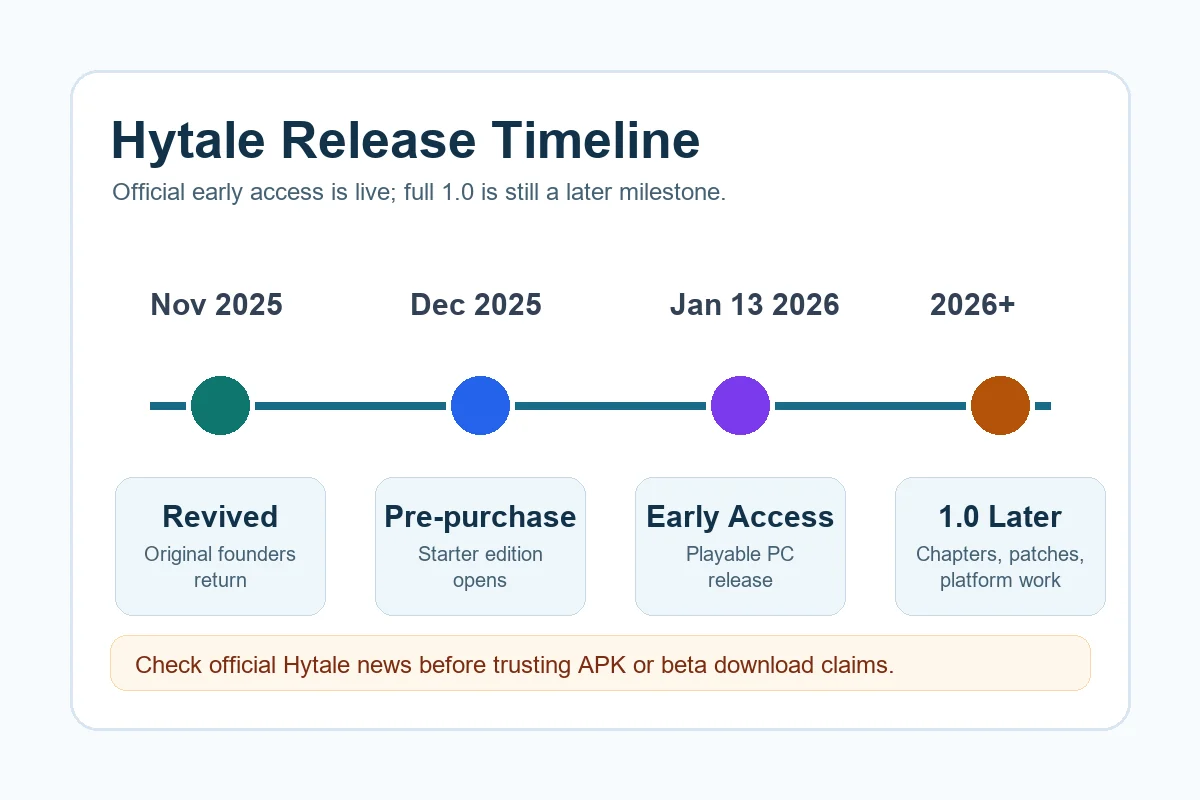
Hytale Early Access launched on January 13, 2026, making the PC build playable through the official account and launcher flow. That is not the same as a finished 1.0 release date. Console support, a native mobile release and later chapters need their own official announcements, so check the date, version and source before trusting a release claim.
What Is the Hytale Release Date Right Now?
The Hytale release date answer depends on which milestone you mean. January 13, 2026 is the official Early Access launch for the playable PC build; it should not be rewritten as a confirmed full-release date. Keep Early Access, a future 1.0 launch, console availability and any native Android version as separate questions.
This distinction matters because search results mix old cancellation news, revival coverage, pre-purchase pages, beta rumors, APK mirrors, and official support articles. A page that simply says a single release date without naming the version can mislead players. Early access can be real and playable while the full release is still unfinished.
If you are returning after years of waiting, the practical path is to check the official download page, confirm the launcher requirements, and read the current support instructions. If another site asks you to install an APK, beta client, modded launcher, or cracked build before Hytale lists that platform, treat it as unverified.
Hytale Release Timeline at a Glance
The exact wording can change as Hytale patches early access, but the safest timeline separates public project milestones from platform-specific availability.
| Milestone | What it means | What players should do |
|---|---|---|
| Project revival | Hytale returned to active public communication after a long uncertain period. | Ignore outdated cancellation-only summaries and check the current official site. |
| Pre-purchase and account flow | Players started seeing official purchase, account, support, and launcher information. | Use only official Hytale account and payment pages; do not trust copied checkout pages. |
| Early access PC play | The playable PC path is the release milestone most players mean when they ask if Hytale is out. | Read hardware requirements, download the official launcher, and expect unfinished features. |
| Full 1.0 and wider platforms | A polished final release, console editions, and native mobile support are separate milestones. | Wait for explicit Hytale announcements rather than assuming early access confirms every platform. |
What Is Available in Early Access?
Early access is useful because it lets players enter the game before every chapter, tool, platform, and service is finished. It is also the reason expectations need to be realistic.
A real playable build is different from a finished 1.0 launch
Early access usually means the core game is available while content, performance, moderation, account features, localization, and server tooling continue to change. Treat patch notes as part of the release experience.
The launcher is the trust boundary
For a game with account login and updates, the official launcher is more important than a random download button. A valid build should come from Hytale's own download or support instructions, not from a mirror that claims to have a hidden beta.
System requirements still matter
Before buying or installing, compare your PC against the current requirements. A machine that handles Minecraft or Roblox is not automatically ready for every Hytale view distance, server, mod, or singleplayer world.
Servers and creator tools may evolve after launch
Many players are waiting for multiplayer communities, modding, creator tools, and private server workflows. These can mature after early access begins, so avoid treating day-one availability as the final feature list.
Expect patches to change the best advice
Early access release advice should be revisited after major patches. Requirements, launcher behavior, server rules, world generation, controller support, and monetization details can all change as Hytale reacts to player data.
PC, Beta, Console and Mobile: What Should You Assume?
For 2026 search intent, PC early access is the safest confirmed direction to plan around. Console versions, cloud play setups, and native mobile editions should be handled as separate platform questions. If Hytale later announces a platform roadmap, use the official platform wording instead of extrapolating from the PC launcher.
The word beta is also easy to misuse. Some players call early access a beta, while scam pages use beta to make an unofficial file sound exclusive. Unless the invitation comes from Hytale's own account system, launcher, support center, or verified social channel, do not enter credentials or payment details.
Mobile searchers should be especially careful because PC release news can be reused by APK pages to imply that a phone build exists. A streaming workaround, an Android download claim, and an official native app are three different things.
- PC: check the official launcher, account instructions, and hardware requirements first.
- Mac/Linux: verify current support notes instead of assuming PC means every desktop OS.
- Console: wait for an explicit PlayStation, Xbox, or Switch announcement before planning a purchase.
- Android/iOS: a native mobile APK or app store listing needs its own official confirmation.
- Cloud play: streaming from your own PC is not the same as a native mobile release.
- Beta keys: avoid resellers, file mirrors, and survey pages claiming private access.
How to Check a Hytale Download Claim Safely
Release-date searches often lead to download pages. Use this checklist before installing anything or signing in. A release page is only trustworthy when the domain, account flow, installer, and support path all point back to Hytale itself. Treat urgency language, private beta claims, password-protected archives, and copied checkout pages as warning signs rather than shortcuts.
- Confirm that the page is on hytale.com or a support domain linked from Hytale's official site.
- Look for consistent account, launcher, support, and refund information before paying.
- Avoid APK files, cracked launchers, compressed archives, and password-protected downloads that claim early access.
- Do not enter Hytale, Riot, Google, Discord, or payment credentials into a page that only appears in search results.
- Check the file path and publisher before running an installer on Windows.
- Use the current hardware requirements guide before buying a version your device cannot run.
Read the Hytale Android APK status guide Check Hytale system requirements
Early Access vs Full Release vs APK Claims
These labels answer different questions, so they should not be mixed in one release-date answer.
| Label | Best meaning | Risk if misunderstood |
|---|---|---|
| Early access | Playable PC release path before every final feature is complete. | Players may expect a finished 1.0 game and be surprised by changes or missing features. |
| Beta | Could mean testing, early access shorthand, or an unofficial claim depending on the source. | Scam pages use beta wording to collect credentials or distribute unsafe files. |
| Full release / 1.0 | A later milestone for the more complete public version. | Treating early access as 1.0 can create wrong platform and feature assumptions. |
| Android APK | A native mobile package only if Hytale officially confirms it. | APK mirrors can be unrelated files, malware, or misleading ad funnels. |
| Server release | Availability of server hosting, private worlds, or community infrastructure. | Server features can differ from client release timing and may change through patches. |
Best Places to Track Hytale Release Updates
A good release-date habit is to watch official sources and ignore pages that cannot cite them. Release information changes fastest around early access, so the source and date of any article matter as much as the headline. If two pages disagree, prefer the newer official Hytale page over a search snippet, repost, or archive.
- Check Hytale's official news page for major release, patch, and platform announcements.
- Use the official download page for launcher availability instead of search-result mirrors.
- Read support articles for account, payment, download, and troubleshooting details.
- Compare your PC against the current hardware requirements before buying or installing.
- Keep Android, APK, and mobile questions separate from PC early access until Hytale confirms mobile support.
- Save the date of the article you are reading; old Hytale pages can rank long after they become outdated.
Bottom Line
For most players in 2026, the useful answer is that Hytale's release conversation now centers on official PC early access, not a random APK, leaked beta, or generic future date. If you want to play, start with the official launcher path and hardware requirements. If you want a full 1.0 date or mobile release, wait for Hytale to state those milestones directly.
The safest interpretation is simple: early access can be real, useful, and worth following, while full release and mobile APK availability remain separate claims that need their own official proof.
For SEO and practical player safety, this page intentionally avoids promising a hidden beta, cracked build, or mobile package. The release-date answer should help players reach the official launcher and avoid unsafe shortcuts, not push them toward a file that Hytale has not verified.
Frequently Asked Questions
References
- Hytale official news
- Hytale official download page
- Hytale support center
- Hytale official hardware requirements
Updated: August 13, 2026