Hytale Player Count 2026: How to Check Live Activity and Server Numbers
A source-led guide to global player counts, server-specific activity, timestamps, versions, and the limits of third-party charts.
Short answer
As of August 10, 2026, there is no official public global Hytale player count that can be quoted as a live worldwide number. Do not copy a number from a generic Steam chart or present one server's population as the total game population. Use official Hytale sources for the current version and server-list context, then label any server-specific observation with its source and time.

Hytale player count: what can be verified today
The search phrase hytale player count sounds like it should produce one number. In practice, it can mean several different things: the number of people playing anywhere in the world, the number online at the same moment, the population of one public server, or general interest in the game. Those measurements are not interchangeable. A page that combines them without defining the scope may look precise while answering the wrong question.
The careful answer for August 10, 2026 is therefore a boundary, not a made-up total. No official Hytale page checked for this guide publishes a public, global, real-time counter. That does not mean the game has no players or that a server cannot show its own population. It means a global figure needs first-party telemetry or a transparent dataset, and neither should be inferred from a search snippet, a single server, or a generic chart.
If you searched for hytale playercount, hytale live player count, or hytale current player count, look for four labels before trusting a result: source, measurement scope, timestamp, and game version or channel. A useful report says whether it is global or server-specific, tells you when it was observed, and explains how the value was obtained. Without those labels, the safest wording is that the number is unverified rather than current.
This page is an evidence guide, not a live counter. It helps you decide what a player-count claim actually measures, how to use official Hytale pages as context, and when a third-party chart should be excluded from an article, post, or server recommendation.
What official Hytale sources confirm
The official Hytale game-updates listing checked for this article identifies Update 5 Hotfix 0.5.7 as the stable line dated July 22, 2026. A version label matters because a server, client, preview channel, or old screenshot can describe a different state of the game. When you quote activity, record the channel and version beside the timestamp instead of treating all Hytale sessions as one pool.
Hytale's official Server Lists article explains public server discovery through profiles, tags, details, and a Join action. That is useful evidence that server discovery is a real product flow, but it is not a promise of a public worldwide player counter. A list can help you inspect individual communities while still leaving the total number of Hytale players unknown.
The official download page checked for this guide provides desktop entry points for Windows, macOS, and Linux. Platform scope is another reason to avoid importing a number from a different ecosystem. A chart that covers one launcher, one storefront, one server cluster, or one platform cannot automatically represent every Hytale player.
These sources give readers a reliable context trail: identify the current official build, use the official discovery or download path, and state exactly what the source does not measure. That approach is more useful than attaching an unsupported live number to a page that may be indexed for years.
Why Hytale player count searches show conflicting numbers
A number can be mathematically correct and still be the wrong answer for the query. Before comparing two values, check whether they describe the same population, moment, platform, and measurement method.

Global concurrent players
This would mean the number of Hytale users playing at the same moment across the defined supported ecosystem. It requires a clear first-party scope and a time window. A server directory, a screenshot, or a search trend cannot establish this total by itself. If a page publishes a global number, check whether it names the telemetry source and the exact capture time before repeating it.
One server's current players
A server may show an online count, a capacity bar, a queue, or a community estimate. That value can be useful for deciding whether a particular community is active, but it is not the Hytale player count. Server populations also move with time zones, events, maintenance, access rules, and the release channel. Label it with the server name, scope, source, and observation time.
Search interest or social activity
Search volume, social posts, video views, and community comments can indicate attention, not concurrent play. They may rise because of a trailer, update, rumor, or download question. These signals belong in a trend discussion and should never be written as the number of active Hytale players.
SteamDB or Steam Charts results
A generic Steam chart is not automatically a Hytale dataset. The result may have a different title, platform scope, listing state, or measurement definition. Do not use a SteamDB or Steam Charts number as proof of Hytale activity unless a trustworthy first-party source explicitly connects the dataset to Hytale and explains the scope.
How to check Hytale activity without inventing a number
Use a small evidence checklist whenever you update this page, write a server description, or answer a reader asking for the Hytale live player count.
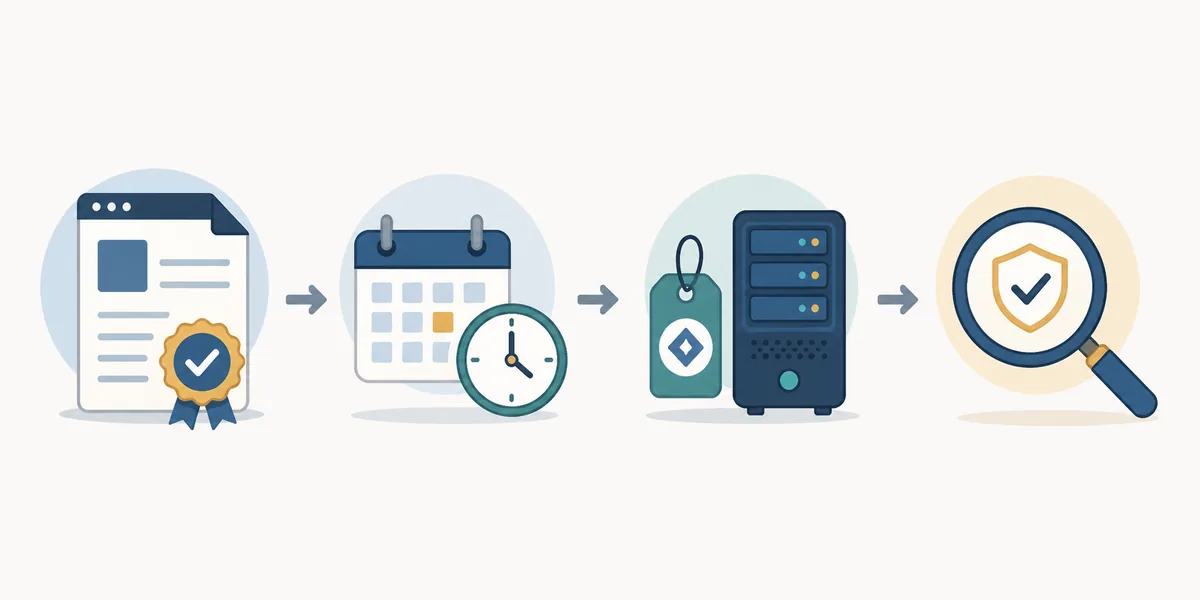
1. Name the source before the number
Open the page, dashboard, server profile, or official announcement that produced the observation. Record the exact URL or source name. A screenshot without provenance is difficult to audit because the value could be edited, cached, or detached from its original context.
2. Define what is being counted
Write global, server-specific, regional, account, queue, or search-interest beside the value. If the source does not define the population, do not upgrade it to a stronger claim. The phrase hytale active player count needs a measurable scope before it can be compared with another result.
3. Add the observation timestamp
Use an exact date and time with a time zone when possible. A value observed during a weekend event or a regional evening can look very different from a weekday morning. Say observed at rather than currently has when the source is not a continuously updated first-party counter.
4. Check version and platform boundaries
Note the stable or preview channel, client version, launcher platform, region, and whether the source covers a public server or a private session. The official update listing and download page are useful anchors for this check, but they do not turn a partial sample into a global total.
5. Use cautious wording in the final sentence
Prefer observed server population, reported by the source at the stated time, or no public global total verified. Avoid live, official, worldwide, and exact total unless the evidence genuinely supports each word. If a source is stale or contradictory, say that the value is unverified and explain what readers can check next.
Global players, server players, and third-party signals
Keep these measurements separate when you compare reports or decide where to place an internal link.
| Measurement | What it can tell you | What it cannot prove |
|---|---|---|
| Official global telemetry | A defined worldwide total at a stated moment | Nothing beyond the source's documented scope and retention window |
| Public server population | Whether one community appears active or has room | The total Hytale population or the health of every server |
| Search or social signals | Whether interest is rising around a launch, update, or question | How many people are playing concurrently |
| Third-party chart | A value from the named dataset if its scope is transparent | That the dataset is Hytale-specific, current, or official without corroboration |
Freshness checks and limits of this page
Player-count questions age quickly. A new update, region opening, server-list change, event, outage, or platform launch can alter activity patterns without creating a public global counter. Recheck the official game-updates listing and any source-specific dashboard before changing a date or attaching the word current to a sentence.
This page intentionally does not embed a made-up number, a generic Steam widget, or a server list presented as a worldwide ranking. The visual assets are explanatory editorial art, not official Hytale screenshots or live telemetry. They show the evidence boundary so the reader can understand the method without mistaking the artwork for a measurement.
The distinction also protects server owners. A small community may be healthy for its time zone and game mode even if it never appears in a broad chart. Conversely, a high number on one dashboard may reflect a queue, accounts, a snapshot, or a different title. Compare like with like, and keep a record of the source that you actually checked.
If you need a broader decision guide, use the site's Hytale multiplayer and Hytale server list pages for joining and discovery workflows. If you need version or release context, use the roadmap and update guides. Those pages answer neighboring questions without forcing a player-count claim into a page where it cannot be verified.
Editorial rule
Never turn a server-specific observation, search-volume figure, or unlabelled third-party chart into an official global Hytale player count. Keep the source, scope, time, and version attached to every number.
Bottom line
The best answer to hytale player count is currently a well-defined evidence statement, not a dramatic number. As of August 10, 2026, this guide could not verify an official public global live counter. Official Hytale pages confirm the current product and server-discovery context, while a global total remains a separate data question.
If you find a number elsewhere, ask whether it measures all Hytale players, one server, one region, one platform, a queue, or general attention. Then check the timestamp and version. A cautious sentence that readers can audit is more valuable than an exact-looking figure that cannot be traced.
For public-community research, start with the official server-list concept and the current in-game route. For friend sessions, use the multiplayer guide. For launcher and release checks, use the official download page and the site's launcher or roadmap guides. These internal links keep each search intent focused and help readers move from evidence to action.
The page will be updated only when a source changes or a verifiable measurement becomes available. Until then, the honest answer is simple: no official global Hytale player count is publicly verified here, and server activity should be reported as server activity.
Frequently Asked Questions
Official References
- Hytale official Server Lists article
- Hytale official game-updates listing
- Hytale official download page
- Hytale official Joining Friends support article
Checked: August 10, 2026
Related Hytale Guides
- Hytale Server List — For discovering and evaluating public communities.
- Hytale Multiplayer Guide — For playing with friends and checking connection scope.
- Hytale Roadmap 2026 — For release channels, updates, and future context.
- Hytale Launcher Guide — For official desktop launcher and platform checks.